16:9 Aspect Ratio Calculator
16:9 remains one of the most common widescreen aspect ratios for TVs, video platforms, monitors and desktop displays. It is the ratio behind HD, Full HD, 4K and 8K television and most YouTube uploads; many laptops and desktop displays use widescreen ratios such as 16:9 and 16:10. Enter any width and height below to see whether it is 16:9, or resize a 16:9 frame to a new size without stretching the picture.
16:9 Calculator
The ratio is pre-filled. Change either dimension and the other one follows.
- Fraction
- —
- Closest common ratio
- —
- Reduced by
- —
Custom Ratio — pick a preset or type your own
- New size
- —
- Total pixels
- —
- CSS
aspect-ratio: —;
Both fields are live. Edit New Width and the 16:9 height recalculates instantly; edit the height and the width follows. The derived dimension is rounded to the nearest whole pixel, while the value you typed is not altered.
Recently used sizes
Saved in this browser only. Click a size to load it back into the calculator.
Common 16:9 pixel sizes and resolutions
9 standard 16:9 sizes, from 640×360 at the small end of the range up to 7680×4320 at the top.
| Resolution | Name | Typical use |
|---|---|---|
| 640 × 360 | nHD | Small web video, embeds |
| 854 × 480 | FWVGA | Legacy web video |
| 1280 × 720 | HD 720p | Streaming, YouTube thumbnail |
| 1366 × 768 | WXGA | Budget laptops |
| 1600 × 900 | HD+ | Entry-level laptops |
| 1920 × 1080 | Full HD 1080p | Monitors, TV, YouTube |
| 2560 × 1440 | QHD 1440p | Gaming monitors |
| 3840 × 2160 | 4K UHD | Modern TVs, cameras, drones |
| 7680 × 4320 | 8K UHD | Flagship TV, cinema capture |
What is 16:9?
A 16:9 frame is sixteen units wide for every nine units tall. Divide 16 by 9 and you get a value of roughly 1.778, so any image whose width is about 1.78 times its height is a 16:9 image. Turned on its side the same rectangle becomes 9:16, which is the portrait shape used by phone video.
The ratio describes shape, not size. A 640 × 360 clip and a 3840 × 2160 clip are both 16:9 even though one has 36 times the pixels of the other. That is why 16:9 carries across resolution changes: 720p, 1080p, 1440p, 4K and 8K all share the same shape, so existing footage does not have to be re-cropped when a new display generation arrives.
How to use the 16:9 calculator
Three ways to get a 16:9 answer, depending on what you already know.
- You know the size and want it checked. Open the Dimensions → Ratio tab and type your width and height. The tool divides out the greatest common divisor and tells you whether you are truly on 16:9 or merely close to it — a 1366 × 768 laptop panel, for instance, reports 683:384 rather than a clean 16:9.
- You know one side and want the other. Switch to Resize by Ratio, leave the ratio at 16:9 and type the width or height you already have. The missing dimension is filled in and rounded to a whole pixel, because a screen cannot draw half of one.
- You want the code or the numbers. Copy Ratio gives you the simplified fraction, Copy Dimensions gives you the exact pixel pair, and Copy CSS hands you a ready-made
aspect-ratiodeclaration to paste into a stylesheet.
Every calculation runs in your browser. Nothing is uploaded, so you can check a client's file or an unreleased export without sending it anywhere.
How to calculate 16:9
You do not need a calculator app to work out a 16:9 size, but the arithmetic is easy to get wrong when you start from an odd number.
- Take the width you want to keep and divide it by 16.
- Multiply that result by 9 to get the matching height.
- Round the height to the nearest whole pixel — half pixels do not exist on a screen.
Worked example
Starting from 1920 pixels wide: 1920 ÷ 16 = 120, then 120 × 9 = 1080. The matching height is 1920 × 1080. Working from 2560: 2560 ÷ 16 = 160, and 160 × 9 = 1440, giving the 2560 × 1440 monitor size. If you already know the height instead, divide by 9 and multiply by 16 — 720 ÷ 9 = 80, and 80 × 16 = 1280.
Common mistakes with 16:9
The biggest mix-up is assuming any "widescreen" video or display is 16:9. Most theatrical film is actually shot at 1.85:1 (flat widescreen) or 2.39:1 (anamorphic scope), both noticeably wider than 16:9 — that's why movies still show letterbox bars on a 16:9 TV. On the display side, a 1366 × 768 laptop panel is marketed as 16:9 but reduces to 683:384, about 0.05% wider than true 16:9 — invisible to the eye but enough to throw off pixel-exact layouts. The other common error is confusing 16:9 (1.778) with 16:10 (1.6); the numbers look similar but 16:10 is a visibly taller frame, common on MacBooks and business laptops rather than TVs or streaming video.
How 16:9 compares to its neighbours
Closest in shape is 1.85:1 at 1.850 — theatrical flat widescreen. The decimal value, not the size, is what changes.
| Ratio | Decimal | Feel | Typical use |
|---|---|---|---|
| 16:10 | 1.600 | Taller | Laptops, productivity monitors |
| 16:9 | 1.778 | — | TV, YouTube, most monitors |
| 1.85:1 | 1.850 | Slightly wider | Theatrical flat widescreen |
| 2.39:1 | 2.390 | Much wider | Anamorphic cinema |
Worked resize example
To fit 16:9 to a 4K master: 3840 ÷ 16 = 240, then 240 × 9 = 2160. That gives 3840 × 2160 — 4K UHD, the resolution most cinema cameras and streaming platforms deliver, and an exact 16:9 frame.
Type your own numbers into the 16:9 calculator above and it will show the same division, plus the reduced ratio and the CSS to copy.
Common uses of 16:9
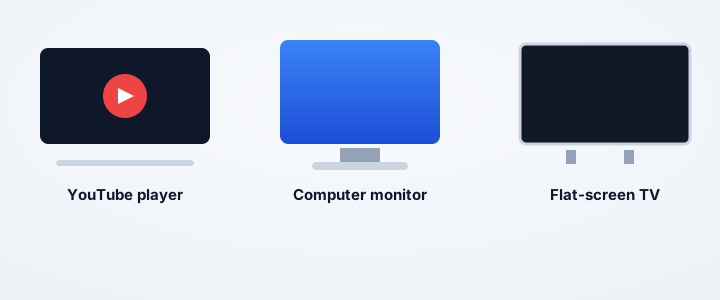
- YouTube and Vimeo uploads, where 1920 × 1080 is a common master size.
- Television broadcasts and streaming platforms, which commonly deliver 16:9.
- Laptop and desktop monitors, from 1366 × 768 budget panels up to 3840 × 2160.
- Video thumbnails and social share cards, which are cropped to 16:9 by most platforms.
- PowerPoint and Keynote widescreen decks, which use a 16:9 widescreen slide size.
- Web hero banners and video embeds that need to fill a 16:9 container without letterboxing.
Need a wider frame? See 21:9 and 2.39:1, or a taller one with 16:10.
Real 16:9 conversions
Four everyday source sizes and what each one costs to land on 16:9.
| Source | Source ratio | 16:9 result | What changed |
|---|---|---|---|
| 1920 × 1080 | 16:9 | 1920 × 1080 | Already correct — nothing to do. |
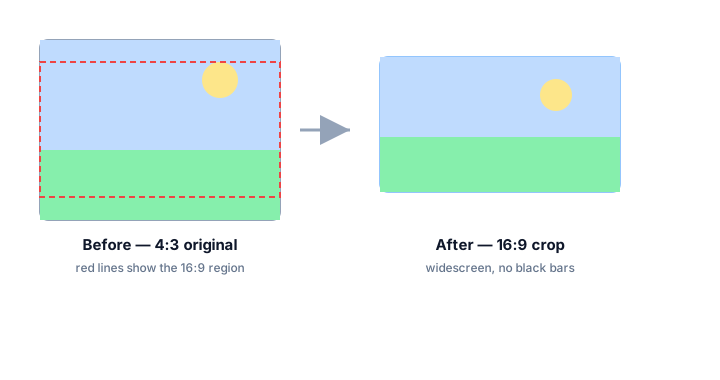
| 1024 × 768 | 4:3 | 1024 × 576 | 192 px trimmed from the height (25%). |
| 1080 × 1080 | 1:1 | 1080 × 608 | 472 px trimmed from the height (44%). |
| 3000 × 2000 | 3:2 | 3000 × 1688 | 312 px trimmed from the height (16%). |
Every row keeps the full width and trims the height, which is the least destructive way to reach a wider shape — you keep every horizontal pixel you already have. If you need to keep the height instead, perhaps because a video timeline is locked, switch to Resize by Ratio and let the calculator work out the new width.
16:9 FAQ
How do I convert a 4:3 video to 16:9 without distorting it?
Crop the top and bottom rather than stretching the frame. A 1024 × 768 clip becomes 1024 × 576 — the full width is kept and 192 pixels of height are discarded. The alternative, padding the sides with bars, keeps the whole picture but leaves black pillars either side.
What height is a 16:9 image at 4000 pixels wide?
2250 pixels. Divide the width by 16 to get one unit (4000 ÷ 16 = 250) and multiply by 9 to get the height (250 × 9 = 2250). The finished frame is 4000 × 2250.
Why does my 16:9 video have black bars on my monitor?
Because the screen is not 16:9. On a 21:9 ultrawide the bars sit on the left and right; on a 16:10 laptop they sit top and bottom. The bars are the difference between the two shapes, and they are the correct way to display a mismatched frame — stretching to fill the panel would distort the picture.
Is 1920 × 1080 exactly 16:9?
Yes. 1920 ÷ 1080 = 1.777…, which is 16 ÷ 9 exactly. The greatest common divisor of 1920 and 1080 is 120, and 1920 ÷ 120 = 16 while 1080 ÷ 120 = 9.
Is 1366 × 768 16:9?
Almost. 1366 ÷ 768 = 1.7786, which is about 0.05% wider than a true 16:9 frame. It is commonly sold as a 16:9 panel and the difference is invisible in practice, but a strict reduction gives 683:384 rather than 16:9.
What is the difference between 16:9 and 4:3?
16:9 is wider. A 4:3 frame is 1.333 wide for every unit of height, so fitting 4:3 footage into a 16:9 timeline adds pillarbox bars on the left and right, while 16:9 footage in a 4:3 frame gets letterbox bars top and bottom.
How tall is a 16:9 video at 1000 pixels wide?
1000 ÷ 16 = 62.5, and 62.5 × 9 = 562.5. Since a screen cannot show half a pixel, use 563 pixels for the height; the resulting frame is 1000 × 563.
Does cropping to 16:9 lose detail?
Cropping discards whatever falls outside the frame. If your source is taller than 16:9, switch to the Resize by Ratio tab and compute the width that matches your existing height first, so you crop as little as possible.
Embed this 16:9 calculator
Add a free, live aspect ratio calculator to any page in one line of code - no account, no API key, no ads. Every embed credits the tool with a Powered by AspectCalc link, so your readers always know where it came from. See the full embedding guide for height and styling options.
<div class="aspectcalc-embed" style="max-width:100%">
  <iframe id="aspectcalc-frame" src="https://aspectcalc.com/embed?h=640"
          width="100%" height="700" style="border:0;border-radius:12px"
          loading="lazy" title="AspectCalc aspect ratio calculator"></iframe>
  <p style="margin:8px 0 0;font:13px/1.4 system-ui,sans-serif;color:#64748b;text-align:center">Powered by <a href="https://aspectcalc.com/" style="color:#2563eb;text-decoration:none">AspectCalc</a> - free aspect ratio calculator</p>
</div>
<script>
  // Optional: grow the frame to the widget's real height.
  // Delete this whole block to keep a fixed-height frame instead.
  addEventListener('message', function (e) {
    if (e.origin !== 'https://aspectcalc.com') return;
    if (!e.data || e.data.type !== 'aspectcalc-height') return;
    var f = document.getElementById('aspectcalc-frame');
    if (f) f.style.height = e.data.height + 'px';
  });
</script>
The frame starts at a fixed height, so your layout never
jumps. Resize it with ?h= - for example
https://aspectcalc.com/embed?h=520 - or keep the small script in the
snippet and the frame will follow the widget's real height instead.