9:16 Aspect Ratio Calculator
9:16 is a common full-screen vertical format used by TikTok, Instagram Reels, YouTube Shorts, Snapchat and many Stories placements. It is the shape that fills a phone held upright, with no bars at the sides. Use the calculator below to convert or resize any resolution into that shape.
9:16 Calculator
The ratio is pre-filled. Change either dimension and the other one follows.
- Fraction
- —
- Closest common ratio
- —
- Reduced by
- —
Custom Ratio — pick a preset or type your own
- New size
- —
- Total pixels
- —
- CSS
aspect-ratio: —;
Both fields are live. Edit New Width and the 9:16 height recalculates instantly; edit the height and the width follows. The derived dimension is rounded to the nearest whole pixel, while the value you typed is not altered.
Recently used sizes
Saved in this browser only. Click a size to load it back into the calculator.
Common 9:16 pixel sizes and resolutions
6 standard 9:16 sizes, from 360×640 at the small end of the range up to 2160×3840 at the top.
| Resolution | Name | Typical use |
|---|---|---|
| 360 × 640 | nHD vertical | Low-bandwidth previews |
| 540 × 960 | qHD vertical | Legacy phone captures |
| 720 × 1280 | HD vertical | Common vertical video size |
| 1080 × 1920 | Full HD vertical | TikTok, Reels, Shorts, Stories |
| 1440 × 2560 | QHD vertical | High-detail exports |
| 2160 × 3840 | 4K vertical | Master files for later re-crops |
What is 9:16?
9:16 means nine units of width for every sixteen units of height, a decimal value of 0.5625. It is exactly the 16:9 landscape frame rotated ninety degrees, which is why the two numbers are simply swapped rather than re-derived.
The shape is not new — vertical video has existed for as long as there have been phone cameras. What changed is that the player became the screen. When an app occupies the whole display, a vertical clip leaves no black bars, and the platform gives it more visible area. That single layout decision is what pushed 9:16 from an accident of hardware into a dominant short-form format.
How to use the 9:16 calculator
Three routes to a vertical frame, depending on what you are starting from.
- Checking a file you already have. Open Dimensions → Ratio and enter the width and height. The calculator reduces them and names the closest common ratio, so a 1080 × 1350 file is correctly reported as 4:5 rather than being mistaken for vertical video.
- Finding the missing dimension. Switch to Resize by Ratio, keep 9:16 and type whichever side you know. Entering 1080 as the width returns 1920 as the height — the standard export size for Reels, Shorts and TikTok.
- Converting a landscape master. Enter the original size first, then compare it with the 9:16 result to see how much width actually survives. That number tells you whether a crop is usable or whether the shot is worth re-recording vertically.
The preview updates as you type and everything is calculated locally in your browser — no file is uploaded.
How to calculate 9:16
Because 9:16 is just 16:9 flipped, the arithmetic mirrors the landscape method with the operations reversed.
- Divide the height you are working from by 16.
- Multiply that result by 9 to get the matching width.
- Round the width to a whole pixel, then check it against the requirements of the platform or service you plan to use.
Worked example
Starting from a 1920-pixel height, a common phone screen: 1920 ÷ 16 = 120, and 120 × 9 = 1080, giving 1080 × 1920. If you are shooting at 2560 pixels tall, then 2560 ÷ 16 = 160 and 160 × 9 = 1440, which lands on 1440 × 2560. Working from the width instead, multiply by 16 and divide by 9: 1080 × 16 ÷ 9 = 1920.
Common mistakes with 9:16
Treating 9:16 as "16:9 just rotated" ignores that the safe zones are different — TikTok, Reels and Shorts all place UI elements (captions, like and share buttons, usernames) over specific parts of a vertical frame, so content and text need to sit in the middle of the frame, not just any orientation-correct rectangle. Another frequent error is exporting horizontal footage into a 9:16 timeline and leaving thin black bars on either side rather than reframing the shot — viewers scroll past pillarboxed video far more often than full-bleed vertical video. It's also worth not confusing 9:16 with a phone's default photo ratio, which is usually 3:4 (0.75), a noticeably less extreme crop than 9:16 (0.5625).
How 9:16 compares to its neighbours
Closest in shape is 2:3 at 0.667 — portrait photography. The decimal value, not the size, is what changes.
| Ratio | Decimal | Feel | Typical use |
|---|---|---|---|
| 3:4 | 0.750 | Less tall | Default phone camera photos |
| 2:3 | 0.667 | Moderately tall | Portrait photography |
| 9:16 | 0.563 | Very tall | TikTok, Reels, Shorts, Stories |
Worked resize example
For a 4K vertical upload at 2160 pixels wide: 2160 ÷ 9 = 240, then 240 × 16 = 3840. That gives 2160 × 3840 — the vertical 4K frame, four times the pixel count of the 1080 × 1920 export and the size to shoot for if the clip will be reframed later.
Type your own numbers into the 9:16 calculator above and it will show the same division, plus the reduced ratio and the CSS to copy.
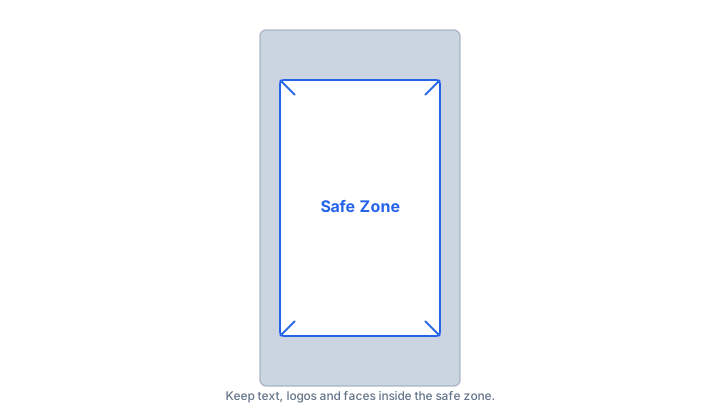
Common uses of 9:16
- TikTok uploads, where 1080 × 1920 is a common export size.
- Instagram Reels, Stories and full-screen vertical feed posts.
- YouTube Shorts, which accept 9:16 uploads at 1080 × 1920.
- Snapchat and WhatsApp Status, both designed around a portrait screen.
- Vertical digital signage and kiosk screens mounted upright.
- Mobile app splash screens and onboarding artwork that must fill the display.

Real 9:16 conversions
What happens to common source shapes when you crop them to vertical video.
| Source | Source ratio | 9:16 result | What changed |
|---|---|---|---|
| 2160 × 3840 | 9:16 | 2160 × 3840 | Already vertical — nothing to do. |
| 1920 × 1080 | 16:9 | 608 × 1080 | 1,312 px of width discarded — about 68%. |
| 1080 × 1350 | 4:5 | 759 × 1350 | 321 px of width discarded — 30%. |
| 1080 × 1080 | 1:1 | 608 × 1080 | 472 px of width discarded — 44%. |
These crops keep the full height, so the results are smaller than the 1080 × 1920 that platforms expect and have to be scaled up afterwards. That is the real cost of converting landscape footage: you are enlarging roughly a third of the original pixels. Shooting vertically at 2160 × 3840 avoids the upscale entirely.
9:16 FAQ
How wide is a 9:16 video at 1080 pixels tall?
About 608 pixels. Divide the height by 16 to get one unit (1080 ÷ 16 = 67.5) and multiply by 9 (67.5 × 9 = 607.5). Rounded to a whole pixel that is 608, giving a frame of 608 × 1080 before any scaling.
Can I use 9:16 for YouTube?
Yes for Shorts, which are vertical and use 1080 × 1920. Standard YouTube uploads remain 16:9 at 1920 × 1080, and a vertical file uploaded as a regular video is played back with large bars either side.
What is the difference between 9:16 and 4:5?
9:16 is much narrower — 0.5625 wide per unit of height against 0.8 for 4:5. In practice 9:16 fills an entire phone screen in Stories, Reels and Shorts, while 4:5 is the tallest portrait Instagram shows inside the feed.
How much of a 16:9 frame survives a 9:16 crop?
Roughly a third. Cropping 1920 × 1080 to 9:16 at full height leaves 608 pixels of the original 1920, which is 32%. That is why a talking-head clip framed for landscape often loses both shoulders, and why vertical video is better shot than converted.
Should I shoot in 9:16 or crop from 16:9?
Shoot vertically whenever the platform is vertical. Cropping a 16:9 master to 9:16 discards roughly two thirds of the frame and usually removes the subject's head or hands. A 2160 × 3840 vertical master also gives you room to crop safely later.
Is 1080 × 1920 a good export size for TikTok?
1080 × 1920 is a common Full HD export size for vertical social video. Larger exports such as 1440 × 2560 are usually re-encoded down, so the extra file size rarely reaches the viewer, and it is worth checking the requirements of the platform you are posting to before you settle on a master size.
Why does my 9:16 video show black bars?
Black bars appear when the file does not match the player's shape. A clip exported at 1080 × 1920 has a decimal ratio of 0.5625 and fills a 9:16 player exactly; a 1080 × 1350 clip is 4:5 and will be padded.
What is 9:16 called?
It is usually called vertical video or portrait video. Unlike 4:3 and 16:9 it has no formal broadcasting name, because it became widespread through mobile apps rather than through a standards body.
Embed this 9:16 calculator
Add a free, live aspect ratio calculator to any page in one line of code - no account, no API key, no ads. Every embed credits the tool with a Powered by AspectCalc link, so your readers always know where it came from. See the full embedding guide for height and styling options.
<div class="aspectcalc-embed" style="max-width:100%">
  <iframe id="aspectcalc-frame" src="https://aspectcalc.com/embed?h=640"
          width="100%" height="700" style="border:0;border-radius:12px"
          loading="lazy" title="AspectCalc aspect ratio calculator"></iframe>
  <p style="margin:8px 0 0;font:13px/1.4 system-ui,sans-serif;color:#64748b;text-align:center">Powered by <a href="https://aspectcalc.com/" style="color:#2563eb;text-decoration:none">AspectCalc</a> - free aspect ratio calculator</p>
</div>
<script>
  // Optional: grow the frame to the widget's real height.
  // Delete this whole block to keep a fixed-height frame instead.
  addEventListener('message', function (e) {
    if (e.origin !== 'https://aspectcalc.com') return;
    if (!e.data || e.data.type !== 'aspectcalc-height') return;
    var f = document.getElementById('aspectcalc-frame');
    if (f) f.style.height = e.data.height + 'px';
  });
</script>
The frame starts at a fixed height, so your layout never
jumps. Resize it with ?h= - for example
https://aspectcalc.com/embed?h=520 - or keep the small script in the
snippet and the frame will follow the widget's real height instead.