2.39:1 Aspect Ratio Calculator
2.39:1 is the wide anamorphic shape commonly associated with cinema releases. It is the frame typically used for Scope trailers, film-look music videos and letterboxed widescreen presentations. Use the calculator to convert a resolution to 2.39:1 or to work out the frame that matches an existing 16:9 width.
2.39:1 Calculator
The ratio is pre-filled. Change either dimension and the other one follows.
- Fraction
- —
- Closest common ratio
- —
- Reduced by
- —
Custom Ratio — pick a preset or type your own
- New size
- —
- Total pixels
- —
- CSS
aspect-ratio: —;
Both fields are live. Edit New Width and the 2.39:1 height recalculates instantly; edit the height and the width follows. The derived dimension is rounded to the nearest whole pixel, while the value you typed is not altered.
Recently used sizes
Saved in this browser only. Click a size to load it back into the calculator.
Common 2.39:1 resolutions
7 standard 2.39:1 sizes, from 1280×536 at the small end of the range up to 7680×3213 at the top.
| Resolution | Name | Typical use |
|---|---|---|
| 1280 × 536 | Scope HD | Lightweight anamorphic renders |
| 1920 × 803 | Scope 1080p | Full HD anamorphic frame |
| 2048 × 857 | Scope 2K | 2K timelines and previews |
| 2560 × 1071 | Scope QHD | High-resolution timelines |
| 3840 × 1607 | Scope 4K | 4K anamorphic mastering |
| 4096 × 1714 | Scope 4K wide | Wide 4K masters |
| 7680 × 3213 | Scope 8K | Reference and archival masters |
What is 2.39:1?
A 2.39:1 frame is 2.39 units wide for every unit of height, which makes it the widest ratio covered on this site. On a 16:9 television it is shown with letterbox bars top and bottom, and those bars are part of the picture rather than a projection fault — they are what keeps the horizontal proportions correct.
The number changed over time. Early widescreen cinema used 2.35:1, and the value used in practice moved to approximately 2.39:1 after a revision to the anamorphic projection specification. Many people still say 2.35:1 out of habit, and on a normal screen the difference of about 1.7% is difficult to see. The two labels are commonly treated as describing the same family of extremely wide frames.
How to calculate 2.39:1
Because one side of the ratio is a decimal, multiplying is easier than dividing. Work in the direction that keeps the arithmetic on whole numbers where possible.
- Divide the width by 2.39 to get the height.
- Round the height to the nearest whole pixel.
- If you know the height instead, multiply it by 2.39 to get the width, then round that to the nearest whole pixel.
Worked example
At 1920 pixels wide: 1920 ÷ 2.39 = 803.35, which rounds to 803 pixels, so the frame is 1920 × 803. At 3840 wide: 3840 ÷ 2.39 = 1606.69, which rounds to 1607, giving 3840 × 1607. Cinema delivery containers are a special case: a DCI 2K Scope master is 2048 × 858 and a DCI 4K Scope master is 4096 × 1716, and those work out to about 2.387 rather than exactly 2.390 — a difference far too small to see on screen.
Common mistakes with 2.39:1
2.39:1 is frequently confused with the older 2.35:1 label — both describe the same family of anamorphic cinema widescreen, but the exact standard shifted slightly in the 1970s when the industry changed how the soundtrack was recorded onto film prints. Today "2.35:1" is often used informally even when the actual ratio being referenced is 2.39:1. It's also worth not assuming DCI digital cinema masters and consumer streaming video use the same height reference — DCI masters are built around fixed container widths (2048 or 4096 pixels) that don't map directly onto typical 1080p or 4K consumer frame sizes.
How 2.39:1 compares to its neighbours
Closest in shape is 21:9 at 2.333 — ultrawide monitor label. The decimal value, not the size, is what changes.
| Ratio | Decimal | Feel | Typical use |
|---|---|---|---|
| 1.85:1 | 1.850 | Narrower | Flat theatrical widescreen |
| 21:9 | 2.333 | Slightly narrower | Ultrawide monitor label |
| 2.39:1 | 2.390 | — | Anamorphic cinema scope |
Worked resize example
For a scope frame at 2560 pixels wide: 2560 ÷ 2.39 = 1071.13, which rounds to 1071, so the frame is 2560 × 1071. Working from 1920 wide instead gives 803, and from 3840 gives 1607 — the height always lands on an awkward number, which is why scope masters are usually built to a fixed container height rather than a round width.
Type your own numbers into the 2.39:1 calculator above and it will show the same division, plus the reduced ratio and the CSS to copy.
Common uses of 2.39:1
- Anamorphic cinema and streaming feature films.
- Scope-format trailers and title sequences.
- Film-look music videos and narrative shorts.
- Letterboxed widescreen presentations of 16:9 footage.
- Cinema DCP mastering at the Scope dimensions used for digital cinema delivery.
- Vertical video that adds cinematic bars for a filmic look.
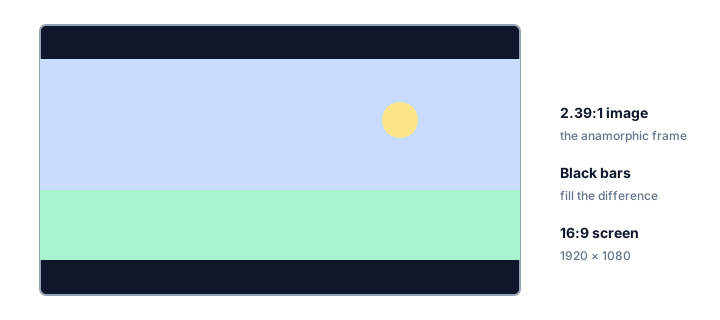
How 2.39:1 fits a 16:9 screen
A 1920 x 803 anamorphic frame placed on a 1920 x 1080 display leaves 277 pixels of unused height, split into two bars of about 138 pixels each. The image fills the full width, so nothing is cropped — the bars are simply the difference between the two shapes.
The bars are not a defect — they are what keeps the picture at the correct proportions. Filling the screen instead would mean cropping the sides of the frame, which is exactly what a television's zoom setting does: 803 / 1080 is about 74%, so a zoom-to-fill would throw away roughly a quarter of the width.
The picture height scales with the screen width. For a 2.39:1 frame the picture height is always the width divided by 2.39:
| Screen width | Picture height |
|---|---|
| 1280 | 536 |
| 1920 | 803 |
| 2560 | 1071 |
| 3840 | 1607 |
2.39:1 FAQ
Is 2.39:1 the same as 2.35:1?
Not exactly. The value used in practice moved from 2.35 to approximately 2.39 after a revision to the anamorphic projection specification, a difference of under 2%. Both figures are still used as labels for wide anamorphic frames, and the difference is difficult to see on a normal screen.
Is 2.39:1 the same as 21:9?
No, though they are often confused. 21:9 equals 2.333 while 2.39:1 equals 2.390, so the cinema ratio is slightly wider. Ultrawide monitors sold as 21:9 are usually 64:27, which equals 2.370 — closer to the cinema value than the name suggests.
Why does a 2.39:1 film have black bars on a 16:9 TV?
The film is wider than the screen, so the image is scaled to fit the width and the remaining height is filled with bars. Cropping the bars away would remove the sides of the frame instead, which is what a television's zoom setting does.
How do I shoot 2.39:1 without an anamorphic lens?
Frame for it in camera using guides, then crop in post. Since most consumer sensor is 16:9 or 3:2, the extra width does not exist in the raw file, so shoot as wide as the sensor allows and accept that the crop will reduce vertical resolution.
Embed this 2.39:1 calculator
Add a free, live aspect ratio calculator to any page in one line of code - no account, no API key, no ads. Every embed credits the tool with a Powered by AspectCalc link, so your readers always know where it came from. See the full embedding guide for height and styling options.
<div class="aspectcalc-embed" style="max-width:100%">
  <iframe id="aspectcalc-frame" src="https://aspectcalc.com/embed?h=640"
          width="100%" height="700" style="border:0;border-radius:12px"
          loading="lazy" title="AspectCalc aspect ratio calculator"></iframe>
  <p style="margin:8px 0 0;font:13px/1.4 system-ui,sans-serif;color:#64748b;text-align:center">Powered by <a href="https://aspectcalc.com/" style="color:#2563eb;text-decoration:none">AspectCalc</a> - free aspect ratio calculator</p>
</div>
<script>
  // Optional: grow the frame to the widget's real height.
  // Delete this whole block to keep a fixed-height frame instead.
  addEventListener('message', function (e) {
    if (e.origin !== 'https://aspectcalc.com') return;
    if (!e.data || e.data.type !== 'aspectcalc-height') return;
    var f = document.getElementById('aspectcalc-frame');
    if (f) f.style.height = e.data.height + 'px';
  });
</script>
The frame starts at a fixed height, so your layout never
jumps. Resize it with ?h= - for example
https://aspectcalc.com/embed?h=520 - or keep the small script in the
snippet and the frame will follow the widget's real height instead.