3:2 Aspect Ratio Calculator
3:2 is the native shape of 35mm film and of the full-frame, APS-C and most mirrorless sensors built to match it. When you open a photo from a DSLR or a phone's 3:2 mode, you are looking at a 3:2 frame. Use the calculator to convert a resolution or work out the print size that fits your pixels.
3:2 Calculator
The ratio is pre-filled. Change either dimension and the other one follows.
- Fraction
- —
- Closest common ratio
- —
- Reduced by
- —
Custom Ratio — pick a preset or type your own
- New size
- —
- Total pixels
- —
- CSS
aspect-ratio: —;
Both fields are live. Edit New Width and the 3:2 height recalculates instantly; edit the height and the width follows. The derived dimension is rounded to the nearest whole pixel, while the value you typed is not altered.
Recently used sizes
Saved in this browser only. Click a size to load it back into the calculator.
Common 3:2 pixel sizes and resolutions
7 standard 3:2 sizes, from 1200×800 at the small end of the range up to 8256×5504 at the top.
| Resolution | Name | Typical use |
|---|---|---|
| 1200 × 800 | Small | Web galleries, email attachments |
| 1500 × 1000 | Web print | Blog images and thumbnails |
| 3000 × 2000 | 6 megapixel | Entry-level camera output |
| 4000 × 2667 | 12 megapixel | Older DSLR and mirrorless bodies |
| 6000 × 4000 | 24 megapixel | Modern full-frame and APS-C |
| 6960 × 4640 | 32 megapixel | High-resolution mirrorless |
| 8256 × 5504 | 45 megapixel | Professional full-frame |
What is 3:2?
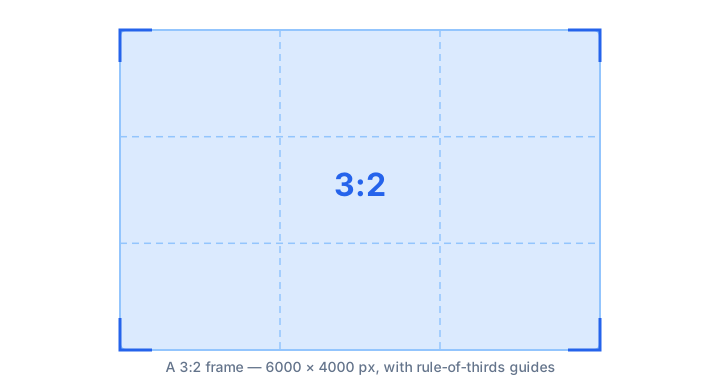
A 3:2 frame is three units wide for every two units tall, a decimal value of exactly 1.5. It is taller than 16:9 but wider than 4:3, which is why it prints cleanly at traditional photo sizes.
The ratio comes from the 36 × 24 mm frame of 35mm film — three units by two. Because the format ran for most of the twentieth century, an enormous amount of photographic infrastructure was built around it: print sizes, negative sleeves, enlarger masks, and later the sensor dimensions of digital cameras. When you shoot in 3:2 you are shooting in the same proportions as a roll of film.
How to calculate 3:2
Because 3:2 reduces to 1.5, every calculation is a simple halving and tripling — the easiest ratio to work with by hand.
- Divide the width by 3.
- Multiply the result by 2 to get the matching height.
- Round to a whole pixel if the width is not evenly divisible by three.
Worked example
At 6000 pixels wide: 6000 ÷ 3 = 2000, and 2000 × 2 = 4000, giving the common 6000 × 4000 full-frame output. At 1500 pixels wide: 1500 ÷ 3 = 500 and 500 × 2 = 1000. Working from height instead, 2667 ÷ 2 = 1333.5 and 1333.5 × 3 = 4000, which is why 12-megapixel cameras produce 4000 × 2667 rather than a round number.
Common mistakes with 3:2
3:2 and 2:3 are easy to swap by accident — 3:2 is landscape, 2:3 is the same shape turned portrait, and mixing them up in a batch-export setting can flip an entire shoot's orientation unintentionally. It's also worth not assuming every camera sensor is 3:2 — Four Thirds and Micro Four Thirds cameras shoot natively at 4:3, so files from those systems won't reduce cleanly to 3:2 no matter how they're cropped.
How 3:2 compares to its neighbours
Closest in shape is 4:3 at 1.333 — four Thirds cameras, older displays. The decimal value, not the size, is what changes.
| Ratio | Decimal | Feel | Typical use |
|---|---|---|---|
| 4:3 | 1.333 | Narrower | Four Thirds cameras, older displays |
| 3:2 | 1.500 | — | 35mm film, DSLR and mirrorless stills |
| 16:9 | 1.778 | Wider | Video, monitors |
Worked resize example
For a mid-size export at 3000 pixels wide: 3000 ÷ 3 = 1000, then 1000 × 2 = 2000. That gives 3000 × 2000, which prints at 10 × 6.7 inches at 300 dots per inch — a useful middle ground between a full-resolution file and a web-sized image.
Type your own numbers into the 3:2 calculator above and it will show the same division, plus the reduced ratio and the CSS to copy.
Common uses of 3:2
- 35mm film and the digital sensors designed to match it.
- Full-frame and APS-C DSLR and mirrorless photography.
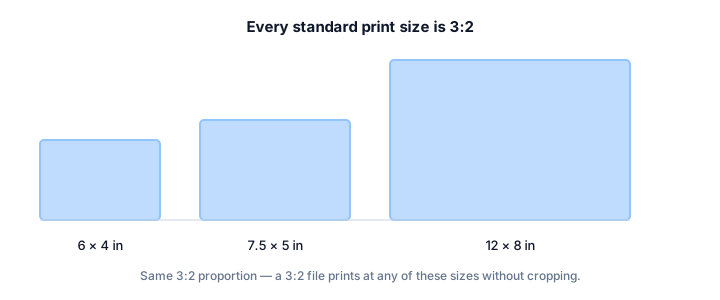
- 6 × 4 inch prints, the most common consumer print size in many markets.
- Microsoft Surface tablets and several laptop and convertible displays.
- DSLR video before it is cropped to 16:9 for delivery.
- Photo books and albums, which are laid out for 3:2 spreads.
Shooting upright? The portrait version of 3:2 is 2:3 — see the 2:3 aspect ratio guide.
3:2 FAQ
Why is 6 × 4 inches a 3:2 print?
Because 6 ÷ 4 = 1.5, exactly the same value as 3 ÷ 2. It is the print size that takes a whole 35mm frame with no cropping at all, which is why it became the very common consumer photo print.
Why do 12-megapixel cameras produce 4000 × 2667 instead of 4000 × 2666?
Because 4000 ÷ 3 = 1333.33, and 1333.33 × 2 = 2666.67. Sensors round up to the nearest full pixel, so the recorded height becomes 2667 and the result is a hair wider than exactly 3:2.
How do I print a 3:2 photo at 8 × 10 inches?
You cannot do it without cropping. 8 × 10 has a ratio of 1.25, so roughly the top and bottom or the sides of the frame must be trimmed. Decide which before printing, or order a 6 × 4 or 9 × 6 print that matches the native ratio.
Is 3:2 the same as 1.5:1?
Yes. 3 ÷ 2 = 1.5, and film references often write it as 1.5:1. The two notations describe identical frames.
Embed this 3:2 calculator
Add a free, live aspect ratio calculator to any page in one line of code - no account, no API key, no ads. Every embed credits the tool with a Powered by AspectCalc link, so your readers always know where it came from. See the full embedding guide for height and styling options.
<div class="aspectcalc-embed" style="max-width:100%">
  <iframe id="aspectcalc-frame" src="https://aspectcalc.com/embed?h=640"
          width="100%" height="700" style="border:0;border-radius:12px"
          loading="lazy" title="AspectCalc aspect ratio calculator"></iframe>
  <p style="margin:8px 0 0;font:13px/1.4 system-ui,sans-serif;color:#64748b;text-align:center">Powered by <a href="https://aspectcalc.com/" style="color:#2563eb;text-decoration:none">AspectCalc</a> - free aspect ratio calculator</p>
</div>
<script>
  // Optional: grow the frame to the widget's real height.
  // Delete this whole block to keep a fixed-height frame instead.
  addEventListener('message', function (e) {
    if (e.origin !== 'https://aspectcalc.com') return;
    if (!e.data || e.data.type !== 'aspectcalc-height') return;
    var f = document.getElementById('aspectcalc-frame');
    if (f) f.style.height = e.data.height + 'px';
  });
</script>
The frame starts at a fixed height, so your layout never
jumps. Resize it with ?h= - for example
https://aspectcalc.com/embed?h=520 - or keep the small script in the
snippet and the frame will follow the widget's real height instead.