21:9 Aspect Ratio Calculator
21:9 is a common marketing label for ultrawide desktop displays, and it is sometimes used loosely for the letterboxed shape of cinema releases as well. Many actual panels use ratios such as 64:27 rather than 21:9. Use the calculator below to convert a resolution to 21:9 or to work out the ultrawide frame that matches a common 16:9 width.
21:9 Calculator
The ratio is pre-filled. Change either dimension and the other one follows.
- Fraction
- —
- Closest common ratio
- —
- Reduced by
- —
Custom Ratio — pick a preset or type your own
- New size
- —
- Total pixels
- —
- CSS
aspect-ratio: —;
Both fields are live. Edit New Width and the 21:9 height recalculates instantly; edit the height and the width follows. The derived dimension is rounded to the nearest whole pixel, while the value you typed is not altered.
Recently used sizes
Saved in this browser only. Click a size to load it back into the calculator.
Ultrawide resolutions and their real ratios
Six ultrawide panel sizes, with the ratio each one actually reduces to. No consumer panel is exactly 21:9.
| Resolution | Name | Typical use |
|---|---|---|
| 2560 × 1080 | 64:27 ultrawide FHD | Entry ultrawide monitors |
| 3360 × 1440 | 21:9 strict | Exactly 21:9 — the arithmetic frame, not a panel |
| 3440 × 1440 | 43:18 ultrawide QHD | A widely used ultrawide size |
| 3840 × 1600 | 12:5 ultrawide 4K | Wider desktop workspaces |
| 5120 × 2160 | 64:27 super ultrawide | Dual-QHD class panels |
| 7680 × 3240 | 64:27 8K ultrawide | Reference and mastering displays |
What is 21:9?
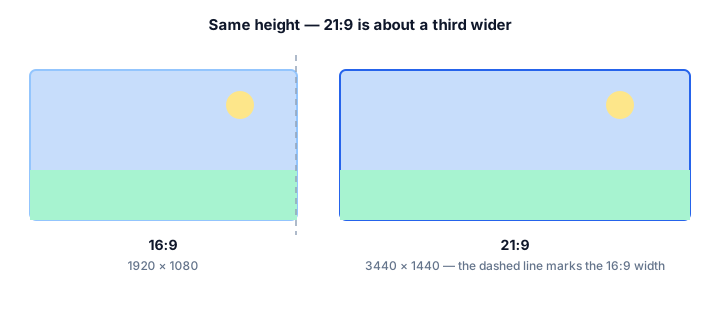
A 21:9 frame is twenty-one units wide for every nine units tall, a decimal value of about 2.333. It is noticeably wider than 16:9 and roughly a third wider again than 4:3, which is what gives ultrawide monitors their immersive, cinematic feel.
The name is a marketing simplification rather than a technical standard. Many panels sold as 21:9 are actually 64:27, which equals 2.370 — the 2560 × 1080 ultrawide size is one of them — while the widely used 3440 × 1440 size reduces to 43:18, which equals 2.389. The cinema anamorphic ratio is a separate value, 2.39:1. These figures, 2.333, 2.370 and 2.390, are close enough that they are often grouped under a single ultrawide label, but none of them is exactly 21:9.
How to calculate 21:9
Ultrawide maths is the same divide-and-multiply routine as any other ratio, but the numbers rarely land on a round answer, so rounding matters.
- Divide the width by 21.
- Multiply the result by 9 to get the height.
- Round the height to a whole pixel — then check whether your monitor's native panel is actually 64:27, which needs a slightly different height.
Worked example
At 2560 pixels wide: 2560 ÷ 21 = 121.9, and 121.9 × 9 = 1097, so a strict 21:9 frame would be 2560 × 1097. The 2560 × 1080 panel actually sold is 64:27 instead, which is slightly shorter. At 3440 wide: 3440 ÷ 21 = 163.8 and 163.8 × 9 = 1474, so a strict 21:9 frame would be 3440 × 1474, while the 3440 × 1440 panel is 43:18. In both cases the hardware is shorter than the label suggests.
Common mistakes with 21:9
"21:9" is used loosely as a marketing label — the actual math (2.333) doesn't exactly match cinema's 2.39:1 scope ratio, even though the two are close enough that people use the terms interchangeably. Many ultrawide monitors sold as "21:9" are also not pixel-exact: a 3440 × 1440 panel actually reduces to 43:18 (about 2.389), closer to cinema scope than to a true 21:9.
How 21:9 compares to its neighbours
Closest in shape is 2.39:1 at 2.390 — anamorphic cinema scope. The decimal value, not the size, is what changes.
| Ratio | Decimal | Feel | Typical use |
|---|---|---|---|
| 16:9 | 1.778 | Narrower | Standard widescreen video |
| 21:9 | 2.333 | — | Ultrawide monitors, cinematic content |
| 2.39:1 | 2.390 | Slightly wider | Anamorphic cinema scope |
Worked resize example
For an exact 21:9 frame at 900 pixels tall: 900 ÷ 9 = 100, then 100 × 21 = 2100. That gives 2100 × 900 — a true 21:9 rectangle, useful as a reference size because most commercial ultrawide monitor resolutions are close to, but not exactly, 21:9.
Type your own numbers into the 21:9 calculator above and it will show the same division, plus the reduced ratio and the CSS to copy.
Common uses of 21:9
- Ultrawide gaming monitors, where the extra field of view is a competitive advantage.
- Video editing timelines, which fit more clips before scrolling.
- Cinematic letterbox framing for trailers and film-look projects.
- Music production and DAW layouts, where horizontal space is at a premium.
- Multi-window desktop work that would otherwise need two displays.
- Financial trading and data dashboards with many parallel columns.
21:9 FAQ
Is 21:9 exactly 2.33:1?
Yes — 21 ÷ 9 = 2.333, which is commonly written 2.33:1. It is not the same as the cinema ratio 2.39:1, though the two are usually grouped together under the ultrawide label.
Why is my 3440 × 1440 monitor sold as 21:9 when it is really 43:18?
Because 21:9 became the marketing shorthand for any panel wider than 16:9. The reduced form of 3440 × 1440 is 43:18, which equals 2.389 rather than 2.333, and the 2560 × 1080 ultrawide size reduces to 64:27, which equals 2.370.
How do I watch 16:9 video on an ultrawide screen?
Either accept pillar bars on the left and right, or zoom the video to fill the width and lose the top and bottom. The aspect ratio calculator in the Resize by Ratio tab shows exactly how much of the frame each option removes.
What is the 21:9 counterpart to 1920 × 1080?
1920 ÷ 21 = 91.4, and 91.4 × 9 = 823, so 1920 × 823 is the strict 21:9 partner. If you want a real panel resolution instead, 2560 × 1080 is the natural step up from 1920 × 1080.
Embed this 21:9 calculator
Add a free, live aspect ratio calculator to any page in one line of code - no account, no API key, no ads. Every embed credits the tool with a Powered by AspectCalc link, so your readers always know where it came from. See the full embedding guide for height and styling options.
<div class="aspectcalc-embed" style="max-width:100%">
  <iframe id="aspectcalc-frame" src="https://aspectcalc.com/embed?h=640"
          width="100%" height="700" style="border:0;border-radius:12px"
          loading="lazy" title="AspectCalc aspect ratio calculator"></iframe>
  <p style="margin:8px 0 0;font:13px/1.4 system-ui,sans-serif;color:#64748b;text-align:center">Powered by <a href="https://aspectcalc.com/" style="color:#2563eb;text-decoration:none">AspectCalc</a> - free aspect ratio calculator</p>
</div>
<script>
  // Optional: grow the frame to the widget's real height.
  // Delete this whole block to keep a fixed-height frame instead.
  addEventListener('message', function (e) {
    if (e.origin !== 'https://aspectcalc.com') return;
    if (!e.data || e.data.type !== 'aspectcalc-height') return;
    var f = document.getElementById('aspectcalc-frame');
    if (f) f.style.height = e.data.height + 'px';
  });
</script>
The frame starts at a fixed height, so your layout never
jumps. Resize it with ?h= - for example
https://aspectcalc.com/embed?h=520 - or keep the small script in the
snippet and the frame will follow the widget's real height instead.